
Ever spent hours fixing the capitalization of your essay, blog, or article line by line?
You’re typing away, flowing with ideas, when suddenly you realize — your text looks like this:
“tHis IS an eXampLe of A tEXT that’s ALL oVer tHe pLaCe.”
Now you’re manually retyping everything, wasting time that could’ve gone into actually writing.
If that sounds familiar — welcome to the club of every writer, student, and editor who’s battled inconsistent text formatting.
But here’s the good news:
You don’t have to fix it manually anymore. With RankStreak’s Case Converter Online, you can change your text case instantly — from lowercase to UPPERCASE, Title Case, Sentence Case, and more — in just one click.
Let’s explore how this simple yet powerful tool can save your time, polish your writing, and make you look like a pro.
Why Case Conversion Matters More Than You Think
Imagine submitting a college assignment or sending a business proposal that starts with a lowercase “h”. Or writing a blog title like:
“how to improve your english grammar in 7 days”
Looks unprofessional, right?
Proper text casing isn’t just about looks — it reflects attention to detail, professionalism, and readability.
Here’s why case formatting matters:
- Improves clarity – Proper casing guides the reader’s eye.
- Creates professional tone – Especially for resumes, cover letters, or research reports.
- Saves editing time – Especially when dealing with large documents.
- Consistency across platforms – Social media captions, blog posts, and ads all look cleaner with uniform casing.
But doing all that manually? That’s where the struggle begins.
😩 The Pain of Manual Case Correction
If you’ve ever tried retyping a 1,000-word essay to fix the letter case, you know it’s time-consuming and boring.
You either:
- Use Find & Replace endlessly.
- Or retype entire sentences while checking each word’s format.
Both options are exhausting.
That’s why smart writers and students now rely on online tools that automate this process in seconds — tools like RankStreak’s Case Converter Online.
What Is a Case Converter Tool?
A case converter tool is a simple online text utility that changes the letter casing of your text automatically.
Whether your text is in all caps, lowercase, or mixed case, the tool instantly converts it into your preferred format.
For example:
| Input Text | Conversion | Result |
|---|---|---|
| “this is amazing” | Uppercase | THIS IS AMAZING |
| “THIS IS AMAZING” | Lowercase | this is amazing |
| “this is amazing” | Title Case | This Is Amazing |
| “this is amazing” | Sentence Case | This is amazing. |
So, if you’re writing essays, emails, or blog posts — the RankStreak Case Converter Tool is a total lifesaver.
How to Use RankStreak’s Case Converter Online
Using this tool is as easy as copy → paste → click.
Here’s a quick step-by-step:
Step 1: Visit the Tool
Go to RankStreak’s Case Converter Online.
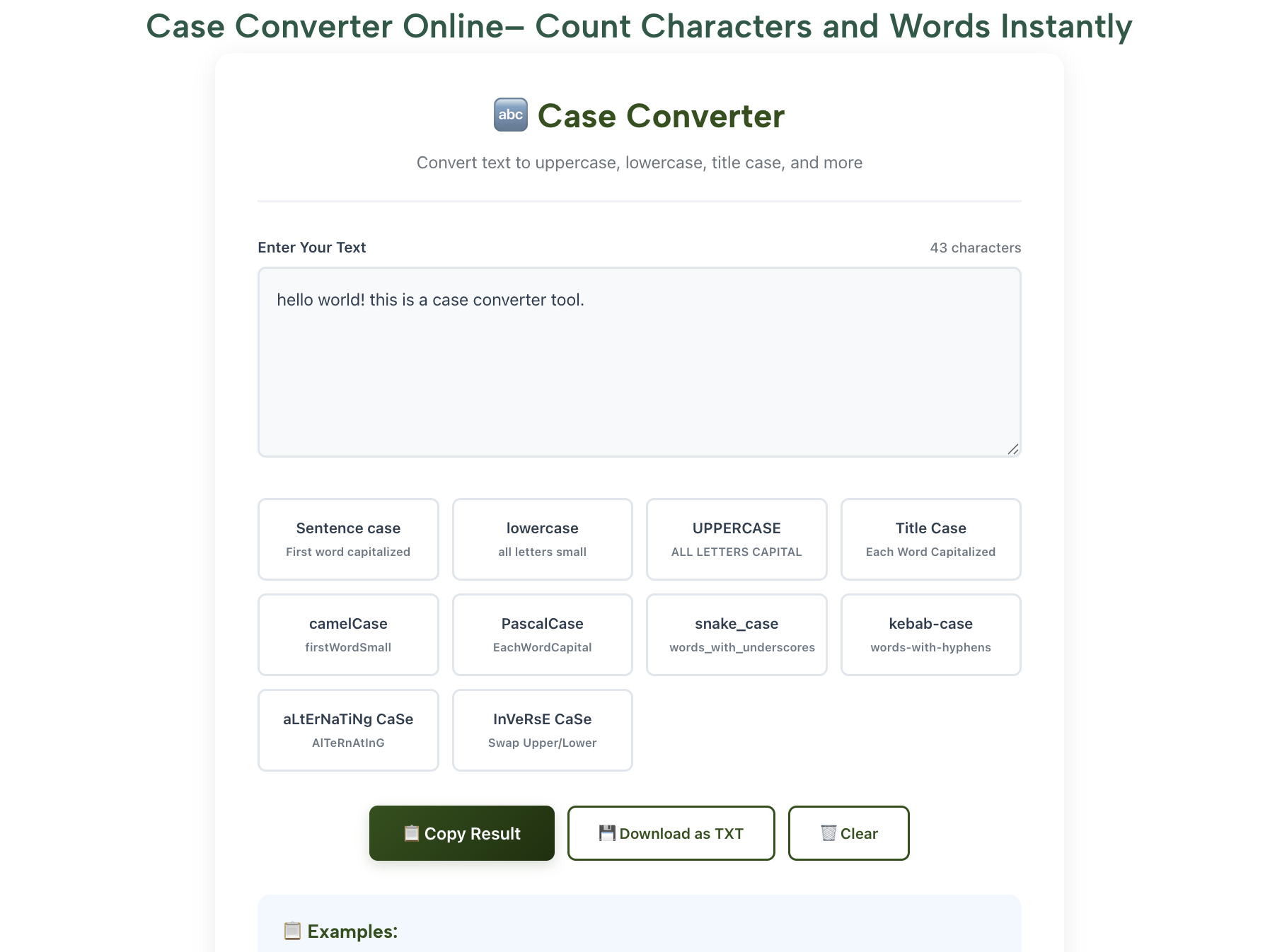
You’ll find a clean interface with a large text box.
Step 2: Paste or Type Your Text
Copy your text from anywhere — Word, Google Docs, or notes — and paste it into the box.
Step 3: Choose the Case Format
You can select from multiple options:
- UPPERCASE – Converts all text to capitals.
- lowercase – Converts everything to small letters.
- Title Case – Capitalizes each word.
- Sentence case – Capitalizes only the first letter of each sentence.
- aLtErNaTiNg CaSe – Fun for creative or meme-style text.
Step 4: Copy or Download the Result
Once done, just click Copy or Download — your perfectly formatted text is ready to use!
Visual idea: Show an image of the tool UI — left side: “this is an example,” right side: “This Is An Example.”
Why RankStreak’s Case Converter Is the Best Choice
There are dozens of text formatting tools online, but RankStreak stands out because it’s simple, accurate, and 100% free.
Here’s why users love it:
- Instant conversion — No lag, even for long paragraphs.
- Multiple formats in one place — Lowercase, UPPERCASE, Sentence case, and more.
- Privacy-friendly — No data saved; everything happens in your browser.
- Mobile responsive — Works seamlessly on phones, tablets, and desktops.
- Lightweight interface — Loads fast, even on slow connections.
- Completely free — No signup, no hidden paywalls.
So whether you’re writing an academic essay or crafting marketing copy, this tool helps you clean and format text in seconds.
Manual Editing vs. Online Case Conversion
Let’s compare the traditional way vs. RankStreak’s way:
| Feature | Manual Editing | RankStreak Case Converter |
|---|---|---|
| Time | Minutes or hours | Instant |
| Accuracy | Depends on human eye | 100% precise |
| Ease of use | Tedious | One click |
| Device support | Limited | Any device |
| Cost | Free (but tiring!) | Free & effortless |
There’s no debate — automated tools win every time.
Real-Life Use Cases
The Case Converter Online isn’t just for writers. It’s useful for:
1. Students
Fix your essays, assignments, and reports instantly. No more losing marks due to formatting mistakes.
2. Content Writers & Bloggers
Format blog titles and paragraphs cleanly to maintain professionalism and readability.
3. Email Marketers
Craft engaging subject lines with perfect capitalization — improve open rates with better presentation.
4. Social Media Managers
Create captions and hashtags in a consistent style for brand identity.
5. Developers & Designers
Use consistent text cases in UI/UX design, code comments, or documentation.
With this tool, your text always looks clean, uniform, and ready to publish anywhere.
Pro Tips to Get the Best Results
Here are a few insider tips to make your formatting even smoother:
- Use Title Case for Headlines – It makes titles and blog sections stand out.
- Use Sentence Case for Articles – Keeps your paragraphs clean and easy to read.
- Avoid All Caps – It feels like shouting when used in full paragraphs!
- Combine Tools for Perfection – Use the Word Counter Tool to track your text length while using the Case Converter.
- Bookmark the Tool – It’s fast, lightweight, and perfect for daily writing.
Why Online Tools Like This Save You Hours
Online tools are the modern-day assistants every writer needs.
Just like an online age finder or date of birth calculator saves you from manual calculations, a case converter online saves you from formatting headaches.
It’s all about productivity — doing more in less time.
At RankStreak, every tool is designed with that goal: to simplify digital tasks for everyone — students, professionals, or creators.
So the next time you’re editing a report, creating a post, or writing an article, skip the manual effort and let RankStreak’s tools handle it.
Fun Fact: The Origin of Case Formatting
Did you know the concept of uppercase and lowercase comes from printing history?
Printers used to store metal type blocks for capital letters in the upper case of the drawer, and small letters in the lower case.
That’s literally where the terms come from — and now, centuries later, you can change them instantly with one click.
If you’re curious, here’s more on it from Wikipedia: Letter Case.
FAQs About Case Converter Online
1. What is a case converter tool?
A case converter online tool automatically changes your text’s capitalization — from uppercase to lowercase, title case, sentence case, and more.
2. Is RankStreak’s Case Converter free to use?
Yes! It’s 100% free, with no sign-up or installation required.
3. Can I convert large paragraphs at once?
Absolutely. The tool handles even long blog posts or essays instantly.
4. Does it work on mobile?
Yes — RankStreak’s tools are fully responsive and mobile-friendly.
5. Does RankStreak save my data?
No. The tool processes everything locally in your browser, ensuring your text remains private.
More Free Tools You’ll Love
Try other helpful tools on RankStreak to make your workflow smoother:
- Word Counter – Check text length instantly.
- Text to Binary Converter – Learn how computers read your words.
- Age Calculator Online – Quickly find your exact age.
Each tool is built to help you save time, stay productive, and learn something new.
Conclusion: Format Smarter, Not Harder
Great writing deserves great presentation.
Don’t waste time fixing capitalization manually — let RankStreak’s Case Converter Online handle it for you.
Fast and accurate
100% free
Perfect for students, writers, and professionals
So go ahead — paste your text, choose your case, and transform your content in seconds!
Because smart writers don’t edit harder — they edit smarter.
#CaseConverter #OnlineTools #RankStreak #TextEditing #WritingTips