Free Online Password Generator - Create Strong, Random Passwords Instantly
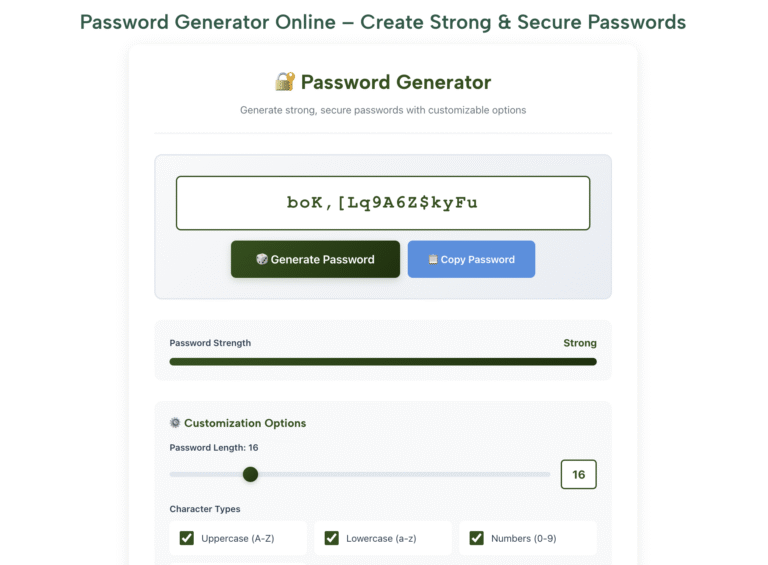
🔐 Password Generator
Generate strong, secure passwords with customizable options
⚙️ Customization Options
🛡️ Password Security Tips
- Use at least 12 characters - Longer passwords are exponentially harder to crack
- Mix character types - Combine uppercase, lowercase, numbers, and symbols
- Avoid personal information - Don't use names, birthdays, or common words
- Use unique passwords - Never reuse passwords across different accounts
- Enable 2FA - Add an extra layer of security whenever possible
- Use a password manager - Safely store and manage all your passwords
- Change regularly - Update important passwords every 3-6 months
Why Use Our Online Password Generator?
Create truly random, strong passwords in seconds with full control over length, character types, and complexity. No sign-up, no data stored, no limits.
Cryptographically Random
Our generator uses your browser's built-in cryptographic API (window.crypto) to produce genuinely random passwords — not pseudo-random patterns. This is the same randomness standard used in security software and password managers.
Fully Customisable
Control password length from 4 to 128 characters. Toggle uppercase letters, lowercase letters, numbers, and symbols individually. Exclude ambiguous characters like O, 0, l, and I that are easy to confuse when typing manually.
Live Strength Indicator
Every generated password is rated for strength in real time — from Weak through Medium, Strong, and Very Strong. The rating is based on character diversity and length so you always know exactly how secure your password is.
Quick Presets
Need a password fast? Use the built-in presets: Simple (8 characters), Medium (12 characters), Strong (16 characters), Ultra Secure (32 characters), or PIN (4 digits). One click sets everything and generates instantly.
100% Private — Nothing Stored
Every password is generated entirely within your browser. Nothing is ever sent to our servers, logged, or stored anywhere. When you close the tab, the password is gone. Safely generate passwords for banking, work, or any sensitive account.
Works on Any Device
Fully responsive design works on phones, tablets, and desktops equally well. No app download required. Open your browser, generate your password, copy it, and you are done in under 10 seconds from any device.
How to Generate a Strong Password
Four straightforward steps — takes under 30 seconds from start to finish.
Set Your Password Length
Use the length slider to choose how many characters your password should contain. For most online accounts, 16 characters is a strong, practical choice. For high-security accounts like banking or email, 20 or more is recommended. For a PIN, 4 or 6 digits is standard. The strength indicator updates as you move the slider so you can see the impact of each length.
Choose Your Character Types
Tick the boxes for character types you want included: uppercase letters (A-Z), lowercase letters (a-z), numbers (0-9), and symbols (!@#$%). Including all four types produces the strongest passwords. If the site you are signing up for does not accept symbols, simply untick that box. The "Exclude Ambiguous Characters" option removes look-alike characters — useful if you ever need to type the password manually.
Click Generate and Check the Strength Rating
Press the Generate Password button. Your new password appears along with its strength rating. If the rating is not as strong as you need, click Generate again for a different password with the same settings. Each click produces a completely different result. Generate as many times as you like until you are satisfied.
Copy and Save It Securely
Click the Copy Password button to copy your password to the clipboard. Paste it immediately into the account or password change field. Because strong passwords are impossible to memorise, save it in a password manager — free options like Bitwarden or the built-in managers in Chrome, Safari, and Firefox work well. Never save passwords in a plain text file or email.
Password Strength Reference Guide
Understanding what separates a weak password from a strong one helps you make the right choice for every account you protect.
| Password Example | Length | Character Types | Strength | Estimated Crack Time |
|---|---|---|---|---|
| password | 8 | Lowercase only | Very Weak | Instantly (top breach lists) |
| Password1 | 9 | Upper + lower + number | Very Weak | Instantly (extremely common pattern) |
| P@ssw0rd! | 9 | All 4 types | Weak | Minutes (known dictionary variant) |
| kX9#mP2q | 8 | All 4 types, random | Medium | Hours to days |
| Tr7$vE@L0ngPw! | 14 | All 4 types, random | Strong | Thousands of years |
| mQ#8vZp!Ry2$Lk@n | 16 | All 4 types, random | Very Strong | Millions of years |
| 32-character fully random | 32 | All 4 types, random | Ultra Secure | Longer than the age of the universe |
| timber-umbrella-falcon-cobalt | 30 | Random words + separator | Very Strong | Millions of years (if words are random) |
| 1234 (PIN) | 4 | Numbers only | Very Weak | Instantly (top 10 most used PINs) |
| 8 random digits (PIN) | 8 | Numbers only | Medium | Minutes to hours by brute force |
Who Needs a Password Generator?
Anyone with more than one online account. Here are the most common situations where a password generator makes a real, immediate difference.
👤 Everyday Users
Setting up a new account for a streaming service, online shop, or social media platform? Generate a unique, strong password for each one instead of reusing the same familiar password. If one service gets breached, your other accounts stay safe.
💼 Professionals & Remote Workers
Work accounts for email, VPN, project tools, and HR systems often require passwords that meet specific complexity rules — minimum length, required symbols, no repeated characters. Our customisation options handle all of these requirements easily.
🎓 Students
University portals, library systems, online learning platforms, and email accounts all need separate secure passwords. Generate a strong unique password for each one and store them in your browser's built-in password manager.
💻 Developers & IT Professionals
Generate random strings for API keys, database passwords, secret tokens, test credentials, and configuration files. Control over character sets and ambiguous character exclusion makes this particularly useful in technical environments.
🏪 Small Business Owners
Business accounts for banking, payment processors, accounting software, and cloud storage need the strongest possible passwords. Generating unique 20+ character passwords for these high-stakes accounts significantly reduces financial and operational risk.
👨👩👧 Families
Help family members — particularly older relatives or children getting their first accounts — set up secure passwords from the start. Use the Simple or Medium preset for accounts where typing is needed occasionally, and store the rest in a password manager.
🔄 After a Data Breach
If you receive a breach notification or discover your email in a leaked database, immediately generate new passwords for that account and any others where you used the same password. Speed matters — change compromised passwords within hours.
📶 Wi-Fi Network Setup
A weak Wi-Fi password is one of the most common security oversights in homes and small offices. Generate a 20+ character random password for your router — you only need to type it once per device, and the security improvement is significant.
Password Security Best Practices
Generating a strong password is the first step. These habits ensure your accounts stay protected long after you set it.
Use a Different Password for Every Account
Reusing passwords is the single biggest cause of account takeovers. When one service is breached, attackers try those credentials on every major platform automatically.
Use a Password Manager
Bitwarden (free), or the password manager built into Chrome, Safari, or Firefox stores unlimited passwords securely. You only need to remember one master password.
Enable Two-Factor Authentication (2FA)
Even the strongest password can be stolen through phishing. 2FA adds a second verification step that stops attackers even if they already have your password.
Never Share Passwords via Email or Chat
Email and most chat apps are not encrypted end-to-end. If you need to share a password, use a dedicated tool like Bitwarden Send or a secure notes app with expiring links.
Check If Your Email Has Been Breached
Visit haveibeenpwned.com and enter your email address. This free service shows which breaches have exposed your email so you know which accounts need immediate password changes.
Prioritise Your Most Important Accounts
Your primary email account is the most critical — it can reset every other password. Give it your longest, most complex password and always protect it with 2FA.
Change Passwords After Any Suspected Breach
If a service notifies you of a breach, change that password immediately. Also change it on any account where you used the same password, even if you think it was unaffected.
Use Random Answers for Security Questions
Security question answers like your mother's maiden name can be found on social media. Use your password generator to create a random answer and save it in your password manager alongside the password.
Understanding Password Security — A Plain-English Guide
Password security is one of those topics that almost everyone knows is important but few people have taken the time to properly understand. The result is that most people's password habits — reusing the same few passwords, using predictable patterns, choosing short passwords — leave their accounts far more vulnerable than they realise. This guide explains how password attacks actually work, what makes a password genuinely strong, and why a random password generator is the most practical solution for most people.
How Attackers Actually Get Into Accounts
The most common method is credential stuffing — attackers obtain lists of usernames and passwords from previously breached websites and try those exact combinations on other services automatically. If you use the same password on two sites and one gets breached, the attacker will try your credentials on email providers, banks, shopping sites, and social media within hours. This is why using a unique password for every account is the single most impactful security habit you can adopt.
Dictionary attacks work by trying every word in a dictionary, then common variations — adding numbers to the end, substituting letters for similar-looking numbers (a for @, e for 3, o for 0), capitalising the first letter. Passwords like "Password1!" or "Secur3!" fail immediately against dictionary attacks because these patterns are well-known and explicitly programmed into attack tools.
Brute force attacks try every possible character combination systematically. This is where password length becomes critical. A six-character lowercase password has roughly 300 million possible combinations — a modern computer can try all of them in seconds. A twelve-character password using all four character types has more possible combinations than grains of sand on Earth, making brute force computationally infeasible within any realistic timeframe.
What Makes a Password Genuinely Strong
A strong password has three core properties: length, randomness, and uniqueness. Length is the most straightforward — every additional character exponentially increases the number of possible combinations an attacker must try. Moving from 8 to 12 characters does not make cracking 50% harder; it makes it millions of times harder, because combinations grow exponentially with each character added.
Randomness means the password was not chosen by a human mind. Human-chosen passwords, even when they seem creative, follow predictable patterns. We capitalise the first letter, add numbers at the end, substitute common letters for numbers, and choose words that mean something to us. Attackers know all of these patterns and their tools exploit them specifically. A password generator using a cryptographic random number generator produces sequences that have no pattern whatsoever — making them genuinely resistant to both dictionary and brute-force attacks.
Uniqueness means the password is used for exactly one account and nowhere else. A unique password can only be compromised by a breach of that specific service — and once you change it afterwards, the exposure is contained entirely.
Password Length vs Complexity — Which Matters More?
The answer from security research is: length matters more than complexity, but both together are best. A 20-character password using only lowercase letters is significantly harder to crack by brute force than a 10-character password using all four character types, because the total number of combinations is dominated by length. However, complexity matters for defeating dictionary attacks — a 20-character string made of a single repeated common word would be cracked instantly despite its length, because dictionary attack tools are designed to catch exactly this pattern.
The practical recommendation from NIST (the US National Institute of Standards and Technology) is to prioritise length — at least 12 characters minimum, with 16 or more preferred — and include multiple character types where the service allows. NIST's updated guidance also notes that mandatory password expiration policies are counterproductive because they lead users to make predictable incremental changes. A strong, unique password does not need to be changed on a schedule — only when there is a specific reason to suspect it has been compromised.
Passphrases — A Memorable Alternative
A passphrase is a password made of multiple random words strung together, optionally with numbers and symbols added. The concept was popularised by security researcher Bruce Schneier. The critical detail is that the words must be genuinely random — not a phrase that means something to you, not a quote, not a proverb. Four or five randomly selected unrelated words — "timber umbrella falcon cobalt" — combined with a number and symbol produce a password that is long, random, and possible to remember through visual association. For accounts where you genuinely need to type the password regularly, such as a computer login, a passphrase may be more practical than a fully random character string while still being very secure.
Password Managers — The Missing Piece
The reason most people reuse passwords is simple: it is impossible to memorise dozens of unique, complex passwords. A password manager solves this completely. It stores all your passwords in an encrypted vault protected by a single master password — the only one you need to memorise. It fills in credentials automatically when you visit saved sites, and most have built-in generators so you can create and save a new strong password in a single step.
Bitwarden is a well-regarded free, open-source option available on all platforms. The password managers built into Chrome, Safari, and Firefox are also solid choices, with the advantage of being already installed. Apple's iCloud Keychain works seamlessly across Apple devices. All of these sync securely across your devices. The master password for your manager should be your strongest, most carefully chosen password — long, random, and never used anywhere else.
Two-Factor Authentication — Your Second Line of Defence
Two-factor authentication (2FA) requires a second verification step in addition to your password when you log in. Even if an attacker obtains your password through a breach or phishing attack, they cannot access your account without also passing the second factor. This makes 2FA one of the most effective account security measures available to ordinary users.
The most secure common form of 2FA is an authenticator app — Google Authenticator, Authy, or Microsoft Authenticator — which generates a six-digit code that changes every 30 seconds. SMS-based 2FA (receiving a code by text) is better than nothing but is vulnerable to SIM-swapping attacks. Enable 2FA on every account that offers it, starting with email, banking, and social media. The small additional friction at login is a worthwhile trade-off for the protection it provides.
How Our Password Generator Protects Your Privacy
Every password generated on this page is created entirely within your browser using JavaScript and the Web Cryptography API (window.crypto.getRandomValues). This is a cryptographically secure random number generator built into modern browsers specifically for security-sensitive applications. It produces genuinely random output that cannot be predicted or reproduced — even by us.
The generation process requires no communication with our servers whatsoever. No data is transmitted, no logs are kept, and no record of any generated password exists anywhere outside your browser session. The moment you navigate away from the page, the password is gone unless you have already copied and saved it. This architecture means there is no server that could be breached to expose your passwords — because no server is involved in the process at all.
Frequently Asked Questions
Common questions about password security and our free online password generator.
Password Generator
Why Word Count Matters for Assignments, Blogs, and Exams in 2025
Why Word Count Matters for Assignments, Blogs, and Exams It’s 11:58 p.m.Your essay prompt says “500 words maximum.”Google Docs shows 512.You delete a sentence.Now 498.You
How to Check Word and Character Count Instantly Online in 2025
How to Check Word and Character Count Instantly Online It’s 11:58 p.m.Your essay is due in two minutes.The requirement? “500 words max.”You highlight the text
Online Word Counter for Students, Bloggers, and Content Writers in 2025
Online Word Counter for Students, Bloggers, and Content Writers in 2025 You’re at 11:59 p.m.Essay due in 1 minute.“500 words max.”You highlight in Google Docs.512.Delete
How a Word Counter Helps in SEO Writing and Blogging in 2025
How a Word Counter Helps in SEO Writing and Blogging in 2025 You hit “Publish.”Your post vanishes on page 5.Why?Too short.Or too long.Ever felt that
Fun Word Scrambler Games for Kids and Students Online in 2025
Fun Word Scrambler Games for Kids and Students Online in 2025 Your child stares at the spelling list.“Boring,” they groan.You try flashcards.They hide them.Ever felt
Best Ways to Use a Word Scrambler for Competitive Exams in 2025
Best Ways to Use a Word Scrambler for Competitive Exams in 2025 You’re in the exam hall.Question 47: Rearrange “LATECH” to form a meaningful word.Clock